
The Five Stages of Coding with AI - 2026-11-13
I recently created a meme for LinkedIn called The Five Stages of Coding with AI.
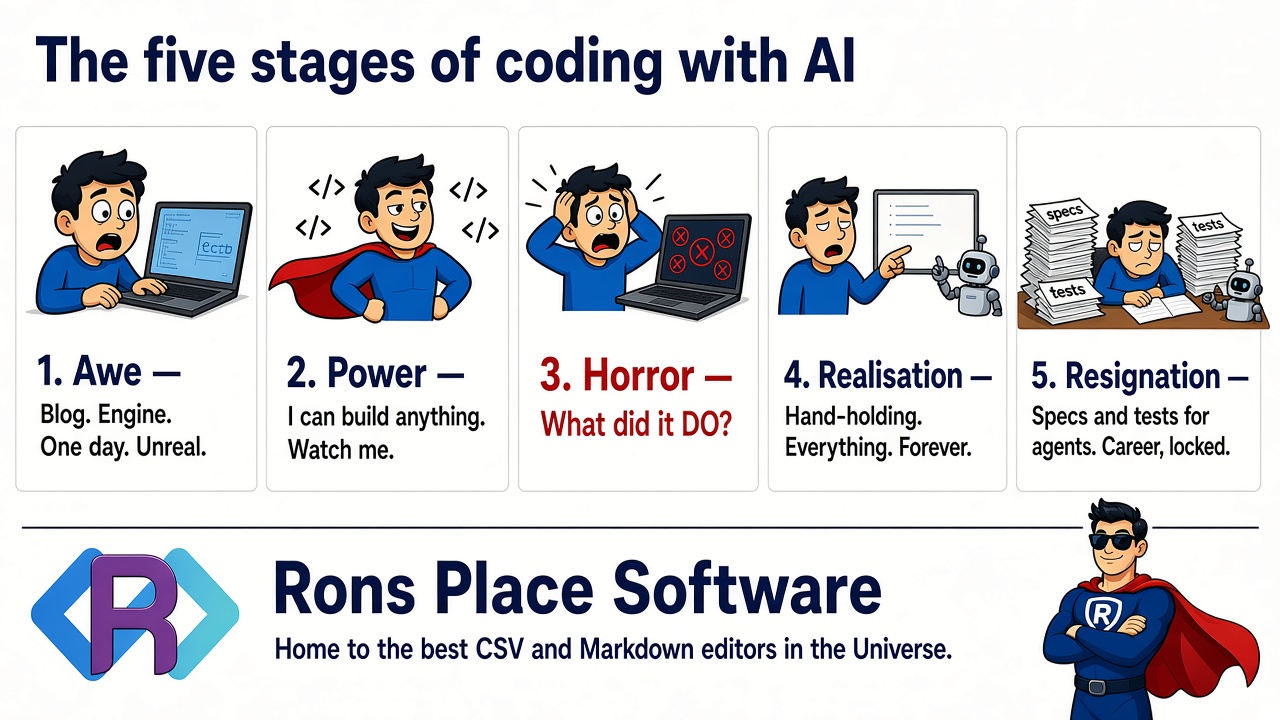
It was not particularly well received, but it was certainly based on my own experience, so I thought I would give it some substance by walking through the writing of Rons Markdown Edit.
Background
The reasons for writing a Markdown editor, when there were already so many, came down to this:
- The existing editors never quite hit the spot. Either they were too heavy, and far too keen to pack in features that had nothing to do with Markdown, or too light, and did nothing more than add a preview to a text editor.
- We already had a lot of the framework and support code available to use.
- I had a great new toy to play with, called AI, which I had recently been experimenting with and had great hopes for.
That leads neatly into the five stages.
Stage 1 - Awe
The awe came before the editor. As an experiment, I did build a blog,
back end and all. I used an AI agent, defined how I wanted it structured, and
iterated through the Agents.md file until I had effectively
vibe-coded a well-structured blog engine.
It had a front end, a middle business-logic layer, and a database back end, all working nicely on .NET 10. It could edit and display articles, and it supported tagging. That is about as far as I took it. The world does not actually need another blog engine, right? (If you do, drop me a message.)
The experience was not entirely smooth, and I had to fight a bit with the MinBot (minion robot), but I was basically stunned at the results.
Stage 2 - Power
From that experience I felt empowered to tackle something much more ambitious.
We do much of our blogging, communication, and notes in Markdown here at Rons Place Software. As I was putting the finishing touches to another of our products, Rons Data Merge, which we use for sending out customer mailings (among other things), I realised we already had a large chunk of the code needed for a Markdown editor.
I was using another editor at the time and it was beginning to get on my nerves, so I decided to dive in.
Creating the structure of the application was relatively simple, because that code already existed. I told the MinBot to create an empty application by replicating the structure of another product, but skipping the application-specific code. It was really good at that, and remains so.
I carried on, and told the MinBot to:
- Create a Markdown parser, and a matching HTML renderer.
- Add the text editor and HTML preview.
- Build out the basic editing commands.
All of this was happening at breakneck speed, and I was in a little developer heaven, thinking of all the donkey work I was so happily delegating to the MinBot.
Stage 3 - Horror
It was when I came to look at the syntax highlighting in the text editor that I
noticed something was not right. The highlighter was having trouble with a line
like this, because it treated * as both a begin and an end token and
got confused:
**Bold text with some *italic* inside it**
I decided to take a totally different approach and build the highlighting from the output map of the parsed Markdown. After all, I had a nice clean Markdown parser, right?
When I looked at the code that had been generated, I was shocked. It was a rat's nest, along these lines:
if(token == '#' || token == '-')
{
	// Something
}
else
{
	_skipNext = true;
}
Not only was the code spread across the back-end libraries — where it belonged, but not organised in any sensible way — it was also peppered all over the front end, in whatever place had looked most convenient at the time.
The structure was no better. That breezy instruction to skip the application-specific code had been taken far more literally than I meant. Whole branches I had assumed were still there were simply gone, and every instruction since had been aimed at a codebase that existed mainly in my head.
Mistake:
-
Not giving the MinBot explicit enough instructions, either in the
Agents.mdfile or in the prompts, left it free to make decisions. Those decisions were not always good, and they were not always consistent. -
The MinBot was not good at iterative development. That had two consequences:
- Changes were not made systemically. They were applied only to the immediate instruction, which fragmented the code.
- Earlier problems with structure, and existing bugs, were compounded. Rather than fix an issue at the core, or alter the existing code so it worked better, the MinBot layered every new request on top of what had come before.
At this point I had to take a serious step back. A few beers and a brisk walk were involved whilst I digested what I was looking at.
Stage 4 - Realisation
I have engaged with outsourcing teams on many occasions in my illustrious career, and as I pondered the MinBot I began to see some parallels.
- Good at boilerplate. Outsourcing teams are good at boilerplate work, such as forms or APIs that have a defined structure and, quite often, design patterns or standards already established for them. With a drawing of a screen, or an outline data schema, the plumbing and the modelling fall out of the design process quite easily.
- Bad at specific business knowledge. Getting business knowledge into an outsourced team has always been painful. In the end, the effort of conveying the intent well enough to get the required result is almost as much work as writing it myself.
- Variable at bug fixing. Outsource teams are paid by the hour, and bug fixing usually falls inside their budget, not the customer's, so it is often treated as work that must be done, but as fast as possible and with the minimum of resource. It is also handed to juniors, who are paid less. The result is often the minimum required to achieve the goal.
- Variable at adding features. When features are added, time has often passed, and you may be dealing with a new team inside the outsourcing company. Because understanding an established codebase takes real effort, new features are often grafted on rather than implemented properly.
In many ways this matched what I had found:
- Good at boilerplate. The MinBot is great at boilerplate plumbing, especially when it has an example.
- Bad at specific business knowledge. Features specific to the application need very careful definition. The MinBot also has a vast amount of prior knowledge to draw on from its training data, so the gap is often hidden. Things can progress smoothly and then, suddenly, the MinBot falls flat on its face. The worst part is that the failure can be buried somewhere inside a large change.
- Variable at bug fixing. Blindly telling the MinBot to fix bugs often produces a local fix, without looking at the underlying cause. Told to do a deep dive, though, it can get over-enthusiastic and shore up every layer of the code between the fix and the place the bug showed up.
- Variable at adding features. As with bug fixing, the MinBot needs to be told how the new feature fits into the codebase.
Tests
The realisation that changed how I worked was about tests. They are what keep either arrangement honest. With an outsourcing team, you run them so a change can be checked for regressions. With the MinBot, that barely begins to cover it.
Markdown parsing is not as trivial as it first appears. Thankfully, plenty of examples and tests already exist and can be harnessed. What did not exist were tests for the interim stages I wanted in the pipeline:
Markdown (text)
  |
Parser
  |
Token stream
  |
HTML Translator
  |
HTML Formatter
  |
HTML (text)
Once those tests existed at every stage, including round-trip tests, I could refactor and, to a certain extent, redesign the Markdown processing in Rons Markdown Edit in one or two exchanges with the MinBot. Performance went up, and the code got smaller. Large refactorings turned out to be one of the things it is genuinely good at, provided the tests were already there.
Stage 5 - Resignation
At times, understanding how the MinBot works — what it is good at, and what it is bad at — starts looking more like psychology than programming.
The mistakes I made throughout the development of Rons Markdown Edit largely came down to communication. More specifically, there was a gap between my understanding of the codebase, my sense of what the MinBot was capable of, and the reality.
And yes (sigh), my days of hacking out code are now largely replaced by hacking out MinBot instructions.
It can still be used to great effect. After all, most software is 5% core logic and 95% plumbing.
In practice, that means:
-
When talking to the MinBot, directly or through an
Agents.mdfile, ask it whether it understands, and get it to rewrite your rules in a way that it understands. - Tell it exactly how you want the application structured.
- Expand on any specific area of domain knowledge.
- Add tests at every possible opportunity. Get the MinBot to do it, but check carefully. Those tests will direct future output as much as any instruction.
- Try to keep domain knowledge out of the prompts and in the core instruction files.
- Iterative programming is natural to us, but it seems to confuse the MinBot. Get it to review its own code regularly, and to reapply the instructions already established.
- Tell it to make bug fixes that are systemic, but still minimal.
Wrapping Up
Awe at a blog engine the world did not need. Power, and Rons Markdown Edit thrown together at breakneck speed. Horror, once I actually read the code. The realisation that I was managing something very like an outsourcing team, kept honest mainly by tests. Then the resignation: less time hacking out code, more time hacking out instructions.
What I have not touched on is code exploration and experimentation. That is a whole other story.
 Rons Data Edit (3)


