
What a Markdown Editor should be - Rons Markdown Edit
Let us begin with the customary disclaimer: this is our opinion. It is an informed one—we ship software, maintain a website full of articles, and merge rather a lot of words into HTML and email—but it is not a standard, a commandment, or the slightest bit legally binding. If your workflow involves seventeen plugins and a ceremonial dance before each commit, we wish you happiness and slightly better knees.
That said, we care about what a Markdown editor ought to be, because we built Rons Markdown Edit after tripping over the same rocks everyone else does.
What we want Markdown for
We use Markdown in three places that actually matter to us:
- Articles — long-form explanations on the site, help topics, and the occasional blog post when someone has something truthful to say.
- Product information — feature lists, overviews, quick starts: text that must stay legible in source form and survive export to HTML without drama.
- Email communication — copy that begins as Markdown, passes through a merge or template step, and ends up as HTML or plain text in someone’s inbox.
Notice what is absent from that list: slide decks, campaign microsites, and the entire theatrical production around “developer experience.” We are writing documents, not mounting the West End version of your README.
Markdown is attractive here because it is portable plain text. The file you save today should open in another editor tomorrow, diff sensibly in version control, and not trap your words in a proprietary snowflake format. That modest ambition drives everything below.
Why we built our own
We looked at the market and suffered the usual Goldilocks crisis.
Some tools were too much — all-in-one “knowledge workspaces” that want to be your second operating system, your CRM, and possibly your therapist. They hide Markdown behind databases, proprietary blocks, or export paths that smell faintly of vendor lock-in. Splendid if you live entirely inside their garden; rather less splendid if you merely wanted to fix a heading.
Others were too little — a plain text buffer with no preview, no structure helpers, and the implicit assumption that you were born knowing whether link syntax prefers round or square brackets first. Notepad is a national treasure; it is not a Markdown editor.
OK we exaggerate a little, but you get the idea.
We also had an unfair advantage: a large share of the code already existed in our other Windows products. Text editing, syntax highlighting, spell checking, folder navigation, preview plumbing, and the general habit of shipping desktop software that does not phone home for permission to save a file—these pieces were already on the bench. Building a dedicated Markdown editor was less “greenfield fantasy” and more “sensible assembly of things we trust.”
So we did.
Our focus: pure Markdown, with help
Rons Markdown Edit is meant to be a pure Markdown editor with as much help as we can give you without rewriting your religion.
That means:
- The source file stays Markdown. What you edit is what you own. Preview is for confidence; it is not a parallel document format you must maintain.
- Toolbar, menu, and Insert commands insert and tidy standard syntax—headings, lists, links, images, tables, task lists—so you are not permanently married to a cheat sheet.
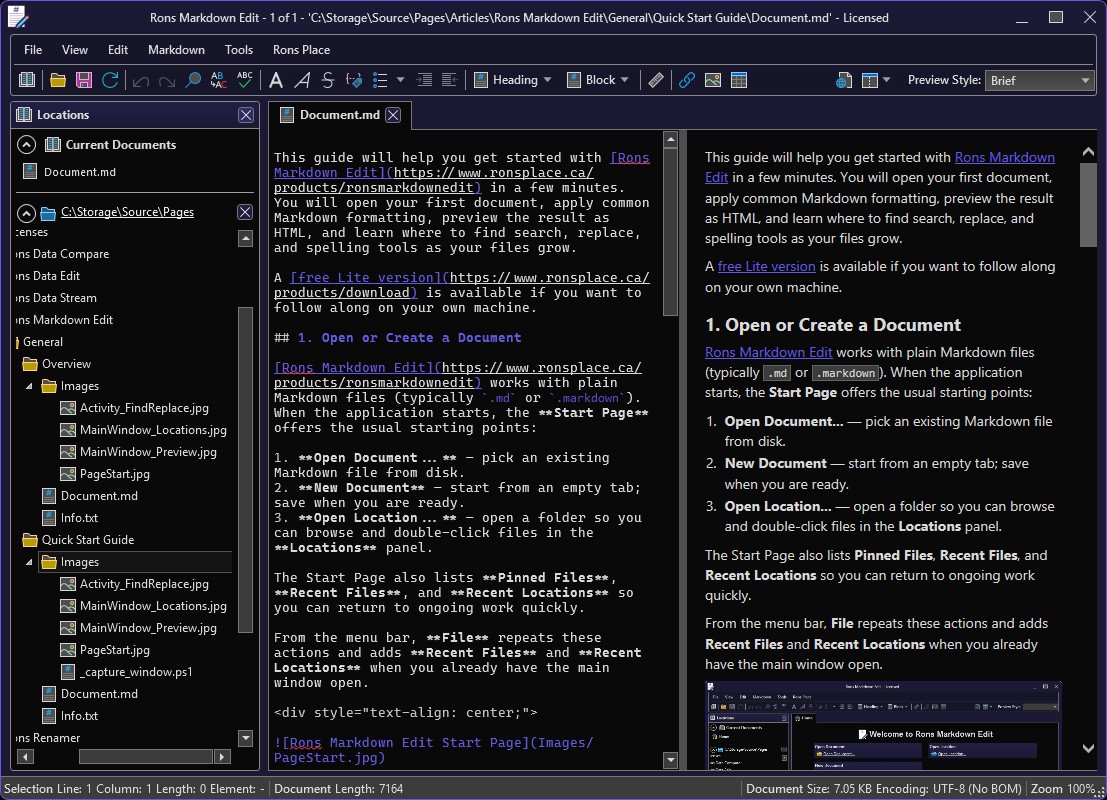
- Live HTML preview, folder Locations, find and replace, spelling, document properties (encoding, line endings): the practical scaffolding around serious writing.
- Paste as Markdown when the clipboard arrives bearing HTML from a browser, because life is too short to hand-stitch tags.
What we are not trying to do is alter or enhance
Markdown as a language. We are not inventing !!! callouts,
proprietary front-matter dialects, or “helpful” shortcuts that only work inside
our application and nowhere else. If a feature would make your .md
file less portable, we are generally against it. For what
Markdown is, and who actually defined it, see
What
is Markdown?.
Our job, as we see it, is to make writing correct Markdown pleasant on Windows—not to turn Markdown into something it was never meant to be.
What a Markdown editor should not pretend to be
Plenty of products wander off the path. We do not claim immunity from sin, but we can at least name the temptations we declined.
Built-in AI
Not needed in the editor. The world has external agents now—Copilot, Cursor, ChatGPT, the enthusiastic intern with an API key—take your pick. Point any of them at a folder of plain Markdown files and they will summarise, rewrite, or hallucinate with industrial efficiency. Baking AI into the editor duplicates that capability, adds UI noise, and encourages you to keep prose in a tool that may change its mind next quarter.
Write Markdown. If you want machine assistance, aim the machine at the file. The editor should excel at editing, not at performing improv.
Built-in Git
Also not needed in the editor. Git is a masterpiece; Markdown
editors are not obliged to reimplement it. Create a repository (git init—shocking
technology). Use GitHub Desktop, Fork, the
command line, or whatever ritual your team already tolerates. Open your
docs folder as a Location in the editor and edit the .md
files sitting in that working tree.
Pull requests, branch policies, and merge conflicts belong in Git tools, not wedged next to the spell checker. We will happily refresh a file from disk when another program changes it; we will not pretend to be your entire DevOps department.
Presentation and “publishing” features
Misdirection. How Markdown looks when published depends entirely on the endpoint: your static site generator, the CSS on ronsplace.ca, the HTML theme in an email merge, GitHub’s stylesheet, or Confluence’s appetite for destruction. The editor’s preview can approximate those outcomes—and ours offers several preview styles—but presentation is not the editor’s job.
Editors that bundle slide mode, CMS publishing, custom component libraries, or “one-click deploy” are often solving a different problem than “help me write Markdown.” Sometimes that is valuable; sometimes it is a Markdown editor in name only. We chose the narrower problem.
So what should it be?
A short manifesto, before the kettle boils:
| Should | Should not |
|---|---|
Edit .md files faithfully
|
Own your content in a proprietary format |
| Help with standard syntax | Invent non-portable Markdown dialects |
| Preview approximately how HTML will read | Pretend preview equals every production site |
| Navigate folders of related docs | Replace Git, GitHub, or your forge of choice |
| Spell-check like a civilised application | Summarise, rewrite, or “assist” via bundled AI |
| Stay fast and local on your machine | Become a subscription-shaped “workspace” |
That is the shape we aimed for. For the tour of buttons and panels, see the Overview of Rons Markdown Edit; for ten minutes of hands-on habit, the Quick Start Guide.
You may as well try it
Opinions are cheap; executables are not. If our view of Markdown editing resonates—or if you are merely curious whether we practise what we preach—a free Lite version is available on the download page.
Open an article draft, a product blurb, or tomorrow’s customer email as Markdown. Turn on preview once. Write without being asked to sign into a cloud workspace or approve an AI rewrite of paragraph three.
We think that is what a Markdown editor should be. What it should not be is everything else— and we have enough everything-else applications already, thank you very much.
Related Information
Rons Markdown Edit


