
What is Markdown - Rons Markdown Edit
Markdown is a way of writing plain text that still looks like a proper document when someone—or something—turns it into HTML, PDF, or another polished format. You type ordinary characters on the keyboard—hash marks for headings, asterisks for emphasis, backticks for code—and sensible software interprets those habits as structure. No ribbon of buttons, no proprietary binary soup, and (mercifully) no need to wed yourself to a single word processor for the rest of your natural life.
It is popular for readme files, technical documentation, note-taking, blog
drafts, and any content that must live happily in git beside
your source code. The file extension is usually .md or .markdown.
Because the body remains human-readable text, diffs and merges in version control
stay civilised.
A Tiny Example
# Weekly Shop

Things we *definitely* need:

- Milk
- Bread
- **Tea** (non-negotiable)

See the [official nonsense](https://example.com) for details.
That handful of lines encodes a top-level heading, an emphasised word, a bullet list with strong text, and a hyperlink—without touching a formatting toolbar.
Who Wrote Markdown? (Not Us)
We should be brutally clear on this point: we did not invent Markdown, we do not maintain the standard, and we have no particular authority to redefine it over elevenses. The format was created by John Gruber, with input from Aaron Swartz, and first described in 2004. The canonical description remains Gruber’s project page:
- Markdown — original syntax and philosophy (Daring Fireball)
Since then, the world has done what the world always does: adopted the idea enthusiastically, then slightly disagreed about the details. For stricter, testable rules, see CommonMark:
If your documents land on GitHub, GitLab, or similar forge-style hosts, you will also encounter GitHub Flavoured Markdown (tables, task lists, strikethrough, and other extensions):
For a broader historical summary and the usual crop of caveats, the Markdown article on Wikipedia is a reasonable secondary source—though, like all crowdsourced affairs, it occasionally argues with itself.
When in doubt, trust the specification your renderer actually uses, not whichever blog post shouted loudest in 2016.
Why Bother With Markdown at All?
Markdown earns its keep because it hits a rather sweet spot:
- Portable — plain text survives operating systems, decades, and corporate acquisitions with dignity intact.
- Legible in the raw — you can read the source file in Notepad and still follow the argument.
- Automation-friendly — static site generators, wikis, and CI pipelines know what to do with it.
- Separation of concerns — you write structure and meaning; presentation can be applied later via CSS or templates.
It is not a universal solvent. Complex page layout, embedded spreadsheets, and WYSIWYG finery are not its forte. For structured prose—documentation, articles, specs—it is difficult to beat.
Editing Markdown on Windows: Why Ron's Markdown Edit Helps
You can edit Markdown in any text editor; several million developers do
exactly that and pretend to enjoy it. A dedicated Markdown editor
is more pleasant when you write often, care about preview, or keep whole folders
of related .md files.
Rons Markdown Edit is our Windows application for that job. Again, we are the authors of this program, not of the Markdown language itself—we simply try to respect the syntax the community already uses.
What it brings to the table:
- Source-first editing with toolbar and menu commands for headings, lists, links, images, tables, code blocks, and the other usual suspects—handy when you cannot quite recall whether the link syntax wants parentheses or square brackets.
- Live HTML preview with split views and selectable preview styles, so you see roughly how the finished page will read without running a separate build after every full stop.
- Locations — open a folder and hop between documentation files in tabs, which suits readme trees, wikis checked out from git, and any project where one lonely markdown file is never quite enough.
- Find, replace, and spelling in a dedicated activity panel, plus optional background spell check whilst you type.
- Document properties for encoding and line endings—small details that prevent spectacular rows when a file has travelled between Windows, Linux, and a colleague’s laptop.
- Paste as Markdown when the clipboard arrives bearing HTML from a browser; life is too short to hand-clean tags.
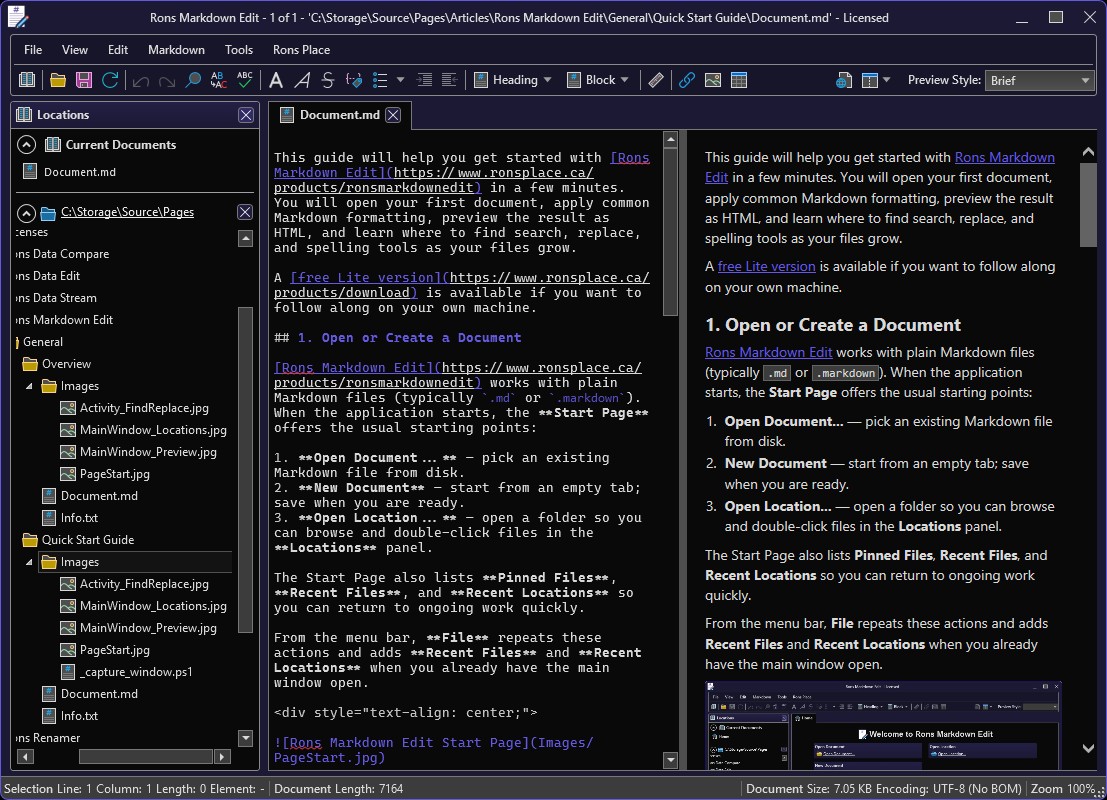
For a tour of the application’s layout and features, see the Overview of Rons Markdown Edit. When you prefer step-by-step instructions, the Quick Start Guide will have you opening files and previewing HTML in short order.
A free Lite version is available if you would like to try the editor on your own machine before committing.
Further Reading (Authoritative and Otherwise)
- Markdown — Daring Fireball — Gruber’s original introduction and syntax reference.
- CommonMark — a rigorous, portable specification and reference implementations.
- GitHub Flavoured Markdown — extensions widely used in repositories and issues.
- Wikipedia: Markdown — background, history, and derivatives.
- Overview of Rons Markdown Edit — our editor, on our site, written by people who actually ship the installer.
That is Markdown in a nutshell: modest punctuation, enormous convenience, and a standards story that belongs to Gruber, CommonMark, GitHub, and the rest of the ecosystem—not to us. We merely offer a rather good place on Windows to write the stuff.
Related Information
Rons Markdown Edit


