
What is Scriban - Rons Data Merge
Scriban is a fast, lightweight text templating language
for .NET. You mingle ordinary text with expressions and control flow inside
{{ and }} markers; a template engine evaluates those
fragments and writes the finished string. The idea is old—mail merge with extra
ambition—but Scriban implements it with a proper parser, a full language (loops,
conditions, pipes), and a sandbox suited to applications that must not let
templates dial arbitrary .NET APIs.
Rons Data Merge uses Scriban for every merge template: text, HTML, Markdown, SQL, and mail bodies. When you preview a row or press Start, the application parses your template with Scriban, binds the current data row to a small model, and renders the result. The syntax colouring in the template editor is Scriban-aware for the same reason.
Who Created Scriban? (Not Us)
We should be brutally clear: we did not invent Scriban, we do
not maintain the language specification, and we are not the authority on whether
your for loop ought to use reversed or merely regrets.
Scriban was created by Alexandre Mutel and is an open-source
project distributed under the BSD 2-Clause licence.
Authoritative places to read about the language itself:
- Scriban on GitHub — source code, readme, release history, and issue tracker.
- Scriban documentation — official docs site (language reference, runtime, Liquid compatibility notes).
- Scriban language reference — syntax of code blocks, statements, expressions, and builtins.
- Scriban on NuGet — package distribution and version information.
Scriban was primarily developed for text templating and also
offers a Liquid compatibility mode (Template.ParseLiquid)
for templates written in Shopify
Liquid. Rons Data Merge parses templates as native Scriban (Template.Parse),
not Liquid. If you are migrating from Liquid-style habits, the
Liquid support in Scriban
page explains what translates cleanly and what does not.
When your template misbehaves, the language reference and Scriban’s own error messages are the final court of appeal—not this article, and certainly not a frustrated shout at the CSV.
What Scriban Looks Like
At its simplest, a Scriban template outputs a value:
Hello {{ row.first_name }}!
Control flow and loops use the same {{ ... }} blocks:
{{ for column in columns }}
  <td>{{ row[column.code] }}</td>
{{ end }}
Expressions can use pipes (built-in functions chained on values), which Scriban inherits from the Liquid tradition:
{{ if !(row.notes | string.whitespace) }}
Notes: {{ row.notes }}
{{ end }}
For literal text that must contain {{ without being executed,
Scriban provides escape blocks ({%{ … }%}).
That matters in SQL or HTML where braces appear for other reasons. See
blocks and escape
syntax in the official reference.
How Rons Data Merge Uses Scriban
Data Merge is a desktop merge tool, not a general-purpose Scriban host. We embed the Scriban NuGet package in the merge engine, compile each template once, and render it whenever the current row or preview position changes.
At a high level:
- Your data grid supplies the table (column names, cell values, encoding).
- The merge operator walks rows—or renders header, body, and footer separately for single-document merges.
-
The scripting layer builds a Scriban
TemplateContext, attaches our model object, and callsRender. - Output goes to a file, a SQL script, an HTML preview pane, or an email body—depending on merge type.
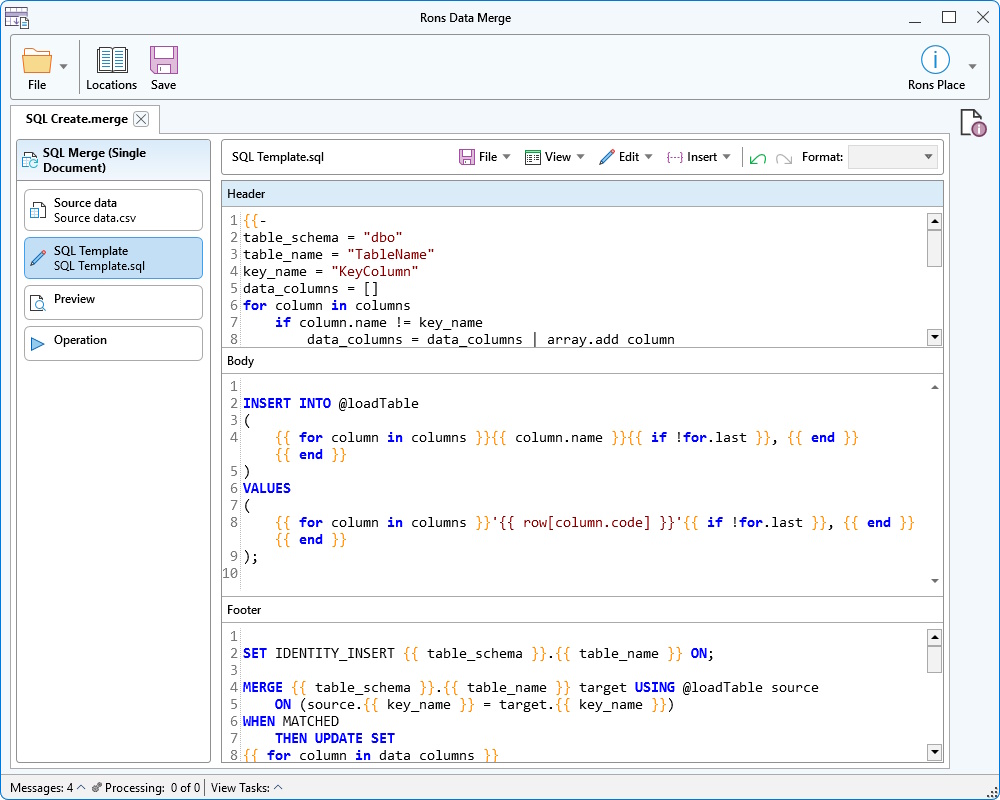
This is the same split described in the Overview of Rons Data Merge: templates are the document; Scriban is the engine that fills them.
Header, body, and footer
Single-document merge types store three template sections (header, body, footer). The application joins them internally; each section is still Scriban. The body section is rendered once per data row with that row loaded into the model. Header and footer render once each. You do not repeat rows inside Scriban for that pattern—the application repeats the body for you.
One file per row merge types use a single template: the whole file is rendered once per record and written to the output folder.
The model your template sees
We expose a fixed root model to Scriban—not the entire .NET framework, which would be a security and support nightmare dressed up as flexibility.
| Root member | Role in Data Merge |
|---|---|
row
|
The current data row: cell values by column code
or index, plus row.index (zero-based row number in the merge).
|
columns
|
The list of column descriptors for the table: name,
code, index, ordinal, type_name,
and count.
|
system
|
Modest environment helpers (for example current Windows user or machine name, environment variables). |
date_time
|
Current date/time strings for “generated on …” boilerplate. |
text
|
Extra string helpers we ship alongside the merge (for example padding and search helpers). |
Column names in the grid are what humans read; column codes
are stable snake_case identifiers derived from those names (for
example First Name → first_name). Templates should
normally use row[column.code] or row.some_code
so renames of the display header do not break the template. The Insert
menu in the editor inserts the correct path—including bracket syntax when a code
is not a plain identifier.
The Insert menu tree is generated from this same model, which is why it stays in sync when you add or rename columns.
Column loops
Column loops are ordinary Scriban for loops over
columns. They are the idiomatic way to build SQL column lists, HTML
tables, or plain-text exports that must adapt when the CSV gains a field:
{{ for column in columns }}
  {{ column.name }}: {{ row[column.code] }}
{{ end }}
A new column in the data appears in columns automatically; a loop
picks it up without editing twenty manual placeholders. The sample templates
shipped with each merge type use this pattern extensively (see our SQL and HTML
samples in the product).
Parsing errors and preview
Templates are parsed when validated or run. Scriban parse errors surface as
readable messages (line and column when available). Record preview
re-renders the active template section with the selected row bound to row,
so you can catch a typo in {{ before generating ten thousand files.
Mail merges still use Scriban for message bodies; To, From, Subject, and provider settings are mapped separately in the merge UI. Bodies are templated; routing is configuration.
A Few Practical Examples
Single HTML table (body section)—header row from column names, body row from values:
{{ for column in columns }}
        <th>{{ column.name }}</th>
{{ end }}
{{ for column in columns }}
        <td>{{ row[column.code] }}</td>
{{ end }}
SQL Insert body (simplified)—loop columns for both names and quoted values:
INSERT INTO output
(
{{ for column in columns }}	{{ column.code }}{{ if !for.last }}, {{ end }}
{{ end }}
)
VALUES
(
{{ for column in columns }}	'{{ row[column.code] }}'{{ if !for.last }},{{ end }}
{{ end }}
);
One file per row (text)—skip empty cells:
{{ for column in columns }}
{{ if !(row[column.code] | string.whitespace) }}
{{ column.name }}: {{ row[column.code] }}
{{ end }}
{{ end }}
These mirror the sample templates bundled with Rons Data Merge; feel free to start from the sample and vandalise it professionally.
Learning More About Scriban
If you outgrow Data Merge’s model and want the full language—if /
case, functions, with blocks, white-space control,
async render, and the rest—the official material is the place to continue:
- Language reference
- Built-in functions
- Runtime and scripting (for context on how hosts embed Scriban; Data Merge implements a narrow subset of that surface)
For using templates inside our application—opening data, choosing a merge type, previewing, and running—see the Rons Data Merge Quick Start Guide and product features.
In Summary
Scriban is an open-source .NET template language maintained by Alexandre Mutel and documented at scriban.github.io. Rons Data Merge is our Windows application that feeds rows and columns into that engine so you can produce documents, SQL, and mail from a table.
We did not write Scriban; we chose it because it is fast, embeddable, and pleasant to read in a template editor. You write the Scriban; we load the row, render the preview, and write the output—preferably after you have inspected row seventeen, which is always the one where someone put commas inside the Company field.
Related Information
Rons Data Merge
General


