
Rons Data Edit for e-Commerce - CSV Editing
Over the years, a significant portion of our users have come from the e‑commerce world. Many manage product catalogs, customer lists, or order data on platforms such as those listed below, and rely on CSV files as their primary import and export format.
E‑Commerce Platforms Used by Our Customers
- Shopify
- Shopify Plus
- BigCommerce
- WooCommerce
- Adobe Commerce (Magento)
- Squarespace
- Wix
- Square Online
- Ecwid by Lightspeed
- PrestaShop
- OpenCart
- Big Cartel
- Shift4Shop
- Volusion
- Jimdo
- Weebly
- Gumroad
- SendOwl
- E-Junkie
- Foxycart
- X-Cart
Enterprise & Headless Commerce Platforms
Why CSV Matters in E‑Commerce
CSV files are the standard format for importing and updating product data across nearly all e‑commerce platforms. They are used for:
- product catalogs
- SKU and variant lists
- pricing updates
- inventory adjustments
- customer records
- order exports
- bulk edits and migrations
Because CSV files are plain text, they are flexible and widely supported — but also sensitive to formatting issues. Even a single misplaced comma, quote, or blank field can cause an upload to fail.
A dedicated CSV editor helps ensure that product data is clean, consistent, and ready for upload.
Common CSV Issues in E‑Commerce Product Uploads
Managing product or SKU lists often leads to errors that block uploads or create inconsistencies on the storefront. These issues cost time, cause frustration, and can lead to incorrect or incomplete product listings.
A dedicated CSV editor solves most of these problems quickly. Rons Data Edit provides a controlled, text‑based environment for working with structured data, making it easy to prepare files for any e‑commerce platform.
Below are some of the most common issues our users encounter, along with how Rons Data Edit helps resolve them.
| Errant Commas and Illegal Quoting | A professional CSV editor ensures that delimiters, quotes, and escape characters are always correctly formatted, preventing upload failures. |
| Unusual Characters |
Lines may be rejected for containing characters such as:
|
| Duplicates | Duplicate SKUs or descriptions can cause upload errors or lead to confusing product listings. Rons Data Edit can automatically remove duplicate rows, or you can use Summary View and Filtered View for a more controlled review. |
| Blank or Missing Values in Required Fields | Missing values often cause imports to fail. Rons Data Edit can remove rows with blanks, sort to reveal missing entries instantly, or use Filter View to isolate incomplete records. |
| Columns Without Data | Empty or unused columns can be removed with a single click, or filled using simple or advanced fill tools. |
Why Rons Data Edit Is Ideal for E‑Commerce CSV Editing
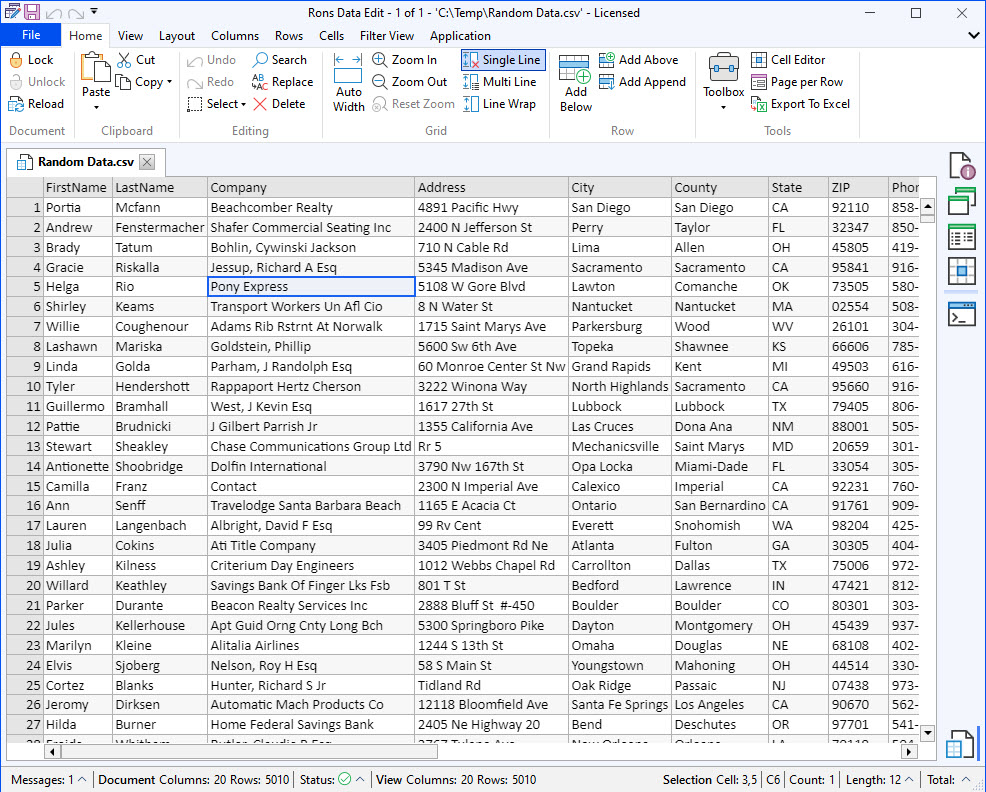
Beyond solving common data issues, Rons Data Edit includes features that make it particularly effective for e‑commerce workflows.
| It Is a Text Editor | Rons Data Edit is a text editor built specifically for structured data. It understands encoding (such as UTF‑8), preserves your data exactly as written, and never alters values unless explicitly instructed. |
| Ease of Use | The interface is fast, clean, and designed for efficient editing. Powerful tools remain easy to access, making everyday tasks quick and predictable. |
| HTML Features |
Many e‑commerce platforms allow or require HTML in product descriptions. Rons
Data Edit includes:
|
| Export to Excel | If a platform requires Excel for upload, Rons Data Edit can export your cleaned CSV into a well‑formatted spreadsheet. |
How Rons Data Edit Saves Time in E‑Commerce Workflows
Because it saves hours of manual work.
Cleaning, validating, and preparing product data becomes faster, safer, and far more predictable with a dedicated CSV editor.
We continue to improve the product based on real user feedback. If you have suggestions or ideas, please contact us.
For a complete list of features, visit the Rons Data Edit home page.
Related Information
- A Perfect Excel alternative to handle CSV files
- How to open and view a CSV file
- Rons Data Edit for e-Commerce
- Text Encoding and Languages in CSV Files
- What is a CSV File
- What is the best CSV Editor
- What is the Difference between Rons Data Edit and Rons Data Stream
CSV Editing
Rons Data Edit


