
Text Encoding and Languages in CSV Files - CSV Editing
Introduction
When working with CSV and other tabular text files, you may occasionally encounter unexpected characters, missing accents, or text that appears corrupted. In most cases, the data itself is not damaged. The file is simply being interpreted using the wrong text encoding.
For many users, an encoding problem looks like corrupted data when in reality the original text is still present. For example:
- 'Café' becomes 'Café'
- 'São Paulo' becomes 'São Paulo'
- 'Résumé' becomes 'Résumé'
Understanding the basics of text encoding can help ensure that multilingual text is displayed and saved correctly.
This article explains the most common text encoding, how Rons Data Edit handles them, and some best practices for working with multilingual data.
What is Text Encoding - Where did it come from?
Early Character Codes
In the 1950s and 1960s, computers used a variety of proprietary encoding schemes. One of the most influential was ASCII (American Standard Code for Information Interchange), standardized in 1963. ASCII used 7 bits to represent 128 characters, including English letters, digits, punctuation marks, and control characters such as carriage return and line feed.
IBM developed a different system called EBCDIC (Extended Binary Coded Decimal Interchange Code), which was widely used on IBM mainframes.
Extended ASCII and Code Pages
As computers spread internationally, ASCII's 128-character limit became a problem. Manufacturers created 8-bit extensions that allowed up to 256 characters. These extensions supported accented letters and special symbols used in various languages.
Unfortunately, different regions and operating systems used different code pages, meaning the same numeric value could represent different characters depending on the system. This often resulted in garbled text when files were exchanged.
Unicode: A Universal Standard
To solve these compatibility issues, the Unicode Consortium launched the Unicode Standard in 1991. Unicode aimed to assign a unique number, called a code point, to every character used in human writing systems.
Unicode supports thousands of characters from languages around the world, as well as mathematical symbols, historical scripts, and emojis.
Unicode Encoding
Unicode code points must still be stored as bytes. Several encoding formats were developed:
- UTF-8: Variable-length encoding using 1 to 4 bytes. Compatible with ASCII and now the dominant encoding on the web.
- UTF-16: Uses 2 or 4 bytes per character and is common in some operating systems and programming environments.
- UTF-32: Uses a fixed 4 bytes per character, making processing simple but storage inefficient.
The Modern Era
Today, UTF-8 is the standard text encoding for the internet, operating systems, databases, and programming languages. Its ability to represent virtually every written character while remaining compatible with ASCII has made it the universal choice for modern computing.
In summary, text encoding evolved from limited character sets like ASCII to the comprehensive Unicode system, enabling reliable communication and information exchange across languages, platforms, and cultures worldwide.
Why Text Encoding Matters
As technology has moved forward it would be nice to say that all the historical problems get solved . . . however, in the case of text encoding the reality is a little more evolutionary.
A CSV file is ultimately just text, so it inherits all of the complications of historical text encoding.
As CSV is a very common data exchange format, encoding issues come to the fore when data moves between different applications, operating systems, databases, or countries, especially when some of those systems are older and have not been updated to modern standards.
Common Text Encoding
UTF‑8
UTF‑8 is the most widely used text encoding today and is generally the safest choice for CSV files. It supports virtually all modern languages while remaining compatible with most applications and operating systems.
If you are unsure which encoding to use, UTF‑8 is usually the best place to start.
UTF‑8 with BOM
A BOM (Byte Order Mark) is a small marker that can be placed at the beginning of a text file.
Some applications use it to identify a file as UTF‑8, while others do not require it. Occasionally a file may work perfectly in one application but behave differently in another because of the presence or absence of a BOM.
UTF‑16
UTF‑16 is commonly encountered in files created by certain Windows applications and enterprise systems. While less common than UTF‑8, it is still widely used.
UTF‑32
UTF‑32 is less frequently used because it requires more storage space than other Unicode encoding. However, it is sometimes encountered in specialist environments.
How Rons Data Edit Handles Text Encoding
Automatic Encoding Detection
Text files do not always make it obvious which encoding they use.
To make life easier, Rons Data Edit can automatically detect the encoding when a file is opened. Most of the time this means the file opens correctly without any manual configuration.
The detected encoding can be viewed in the Document Properties window.
Viewing the Current Encoding or Changing It
If text does not look right, the encoding is often the first thing to check. A simple change can sometimes turn garbled text back into perfectly readable data.
You can view the encoding of a CSV file in Rons Data Edit from the Document Properties panel in the side panel. (The same information can also be accessed from the menu by selecting File → Document Properties). From the Document Properties panel the encoding can be changed, and the document re-loaded to check if the data looks correct.
As shown in the picture below, Rons Data Edit supports a wide range of text encodings, including ASCII (7-bit and 8-bit), UTF‑7, UTF‑8, UTF‑8 without BOM, UTF‑16 (Little Endian and Big Endian), and UTF‑32 (Little Endian and Big Endian). It also supports many language-specific encodings, making it easier to work with data from different regions and writing systems.
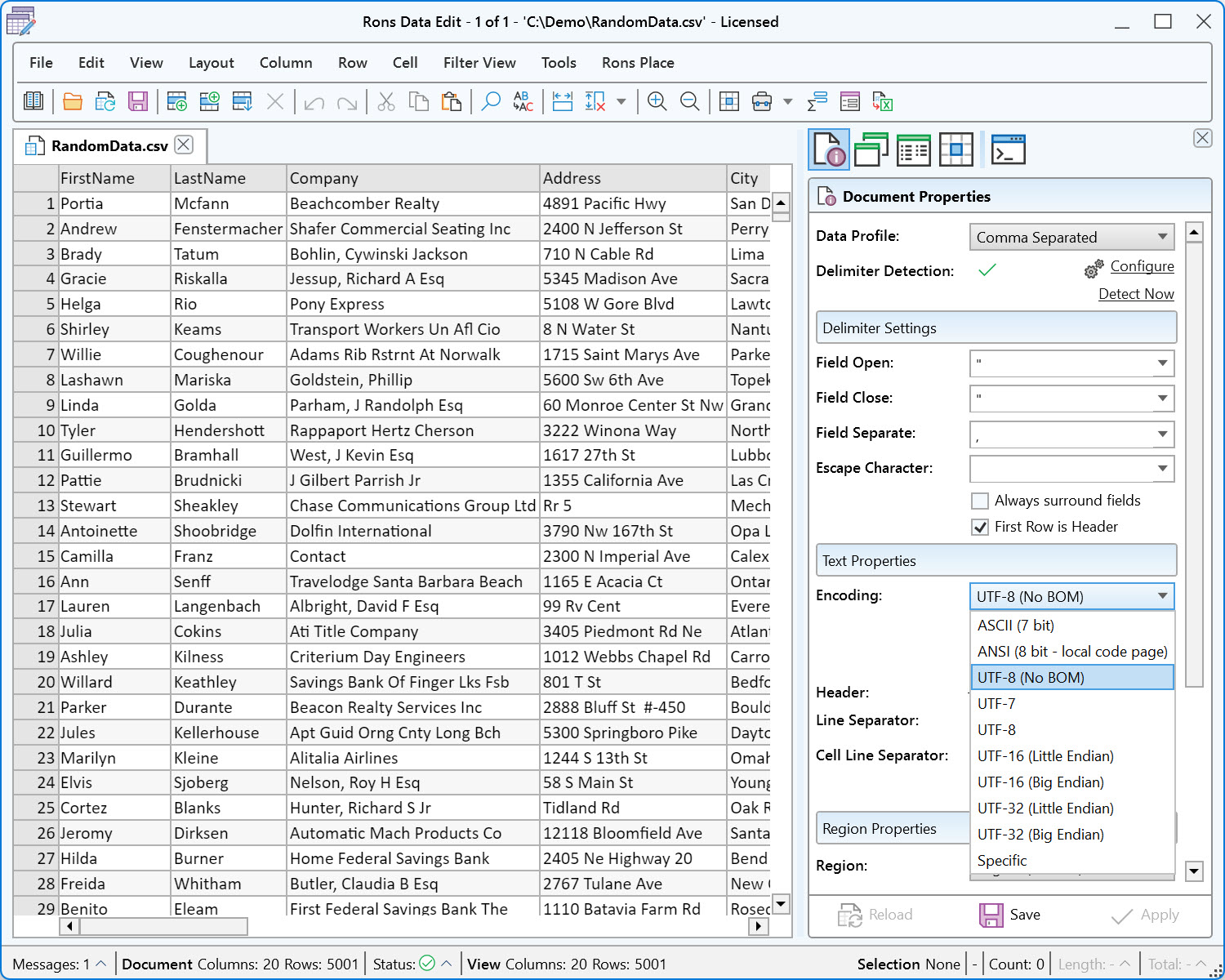
If a file needs to be shared with another application that expects a different encoding, it can be changed in the Document Properties window. Once the desired encoding has been selected, simply save the file to apply the change.
Code Pages - Historical Confusion
Rons Data Edit does an excellent job of detecting text encoding automatically, but automatic detection is not always possible. One particular area where encoding detection is impossible (for everyone) is when the text encoding is Extended ASCII.
This is being mentioned specifically because it causes more confusion than any other aspect of text encoding.
Extended ASCII uses 8-bit character values, allowing for up to 256 possible characters. The first 128 values (0-127) correspond to standard ASCII and are consistent across systems. The remaining 128 values (128-255), however, vary depending on the code page or character set being used. These characters often represent language-specific letters and symbols frequently local to the computer they are running on.
The real problem arises because there is no discernible difference in the text files. For example a file written in France, then sent to Germany, will display a whole different set of characters for any value above 128, because those numbers are mapped, by the users computer, to its own character representation of those numbers. The underlying bytes remain unchanged, but each system interprets those values according to its own character mapping.
Fortunatly Rons Data Edit can deal with this, but it requires the user to intervene by setting the Specific encoding (in Document Properties) to something that matches the language of the origin of the file.
Conclusion
When text does not look right, the encoding is often the first thing worth checking. A simple change can sometimes turn unreadable text back into perfectly valid data. Such a change can be made easily in professional CSV Editor Rons Data Edit.
Most modern CSV files work best with UTF‑8, but older systems and applications may use different encodings. Knowing how to identify and change encodings can save a great deal of time when working with multilingual data.
Related Information
- A Perfect Excel alternative to handle CSV files
- How to open and view a CSV file
- Rons Data Edit for e-Commerce
- Text Encoding and Languages in CSV Files
- What is a CSV File
- What is the best CSV Editor
- What is the Difference between Rons Data Edit and Rons Data Stream
CSV Editing
Rons Data Edit


