
Cleaning CSV Files with Rons Data Edit - Rons Data Edit
CSV files are one of the most common formats for exchanging and importing data. Unfortunately, they often contain small inconsistencies that can cause problems when searching, sorting, importing, or analysing data.
When faced with a new CSV file, it can be difficult to know where to begin. Rather than trying to fix every possible issue at once, it is usually best to start with a handful of common cleanup actions that provide the greatest immediate improvement to data quality.
These tasks can be completed quickly using a professional CSV editor. Throughout this article, we'll use Rons Data Edit as an example. Rons Data Edit is a dedicated CSV editor designed to work with delimited text files, providing tools for cleaning and managing data safely and efficiently. The functions discussed below are available directly within the application.
This article is not intended to be a detailed how-to guide for every CSV cleaning task. Instead, it provides a practical starting point by highlighting the most common cleanup operations that users perform and the types of functions available to accomplish them.
If you're unsure where to start, these are usually the first cleanup actions worth considering:
- Remove Extra Spaces
- Replace Text
- Change Date Format
- Format Numbers
- Edit Column Headers
- Remove Empty Rows and Columns
- Change Text Case
- Remove Duplicates
- Automate Cleaning Tasks with Cleaners
These simple cleanup tasks can significantly improve data quality and prepare files for further processing.
A professional CSV editor such as Rons Data Edit provides the tools needed to perform these common cleanup tasks, making it an excellent starting point for anyone working regularly with CSV data. To explore its CSV editing and data cleaning features, Download Rons Data Edit from Rons Place Software (a free Lite version is available).
Remove Extra Spaces
Extra spaces are among the most common issues found in CSV data. They are often introduced through manual data entry, copy-and-paste operations, or data exported from multiple systems.
Common space-related problems include:
- Leading Spaces (extra spaces at the beginning of a value)
- Trailing Spaces (extra spaces at the end of a value)
- Multiple Consecutive Spaces
While these issues can be difficult to spot visually, they frequently cause matching, filtering, sorting, and lookup operations to fail. A simple trim and cleanup operation can quickly standardize thousands of records. The Remove Space tool is available from the Rons Data Edit Toolbox.
Replace Text
Data often contains outdated values, abbreviations, misspellings, inconsistent terminology, or codes that need updating.
Common examples include:
- Replacing company names after a rebrand
- Correcting recurring spelling mistakes
- Converting abbreviations into full names
- Standardizing categories and labels
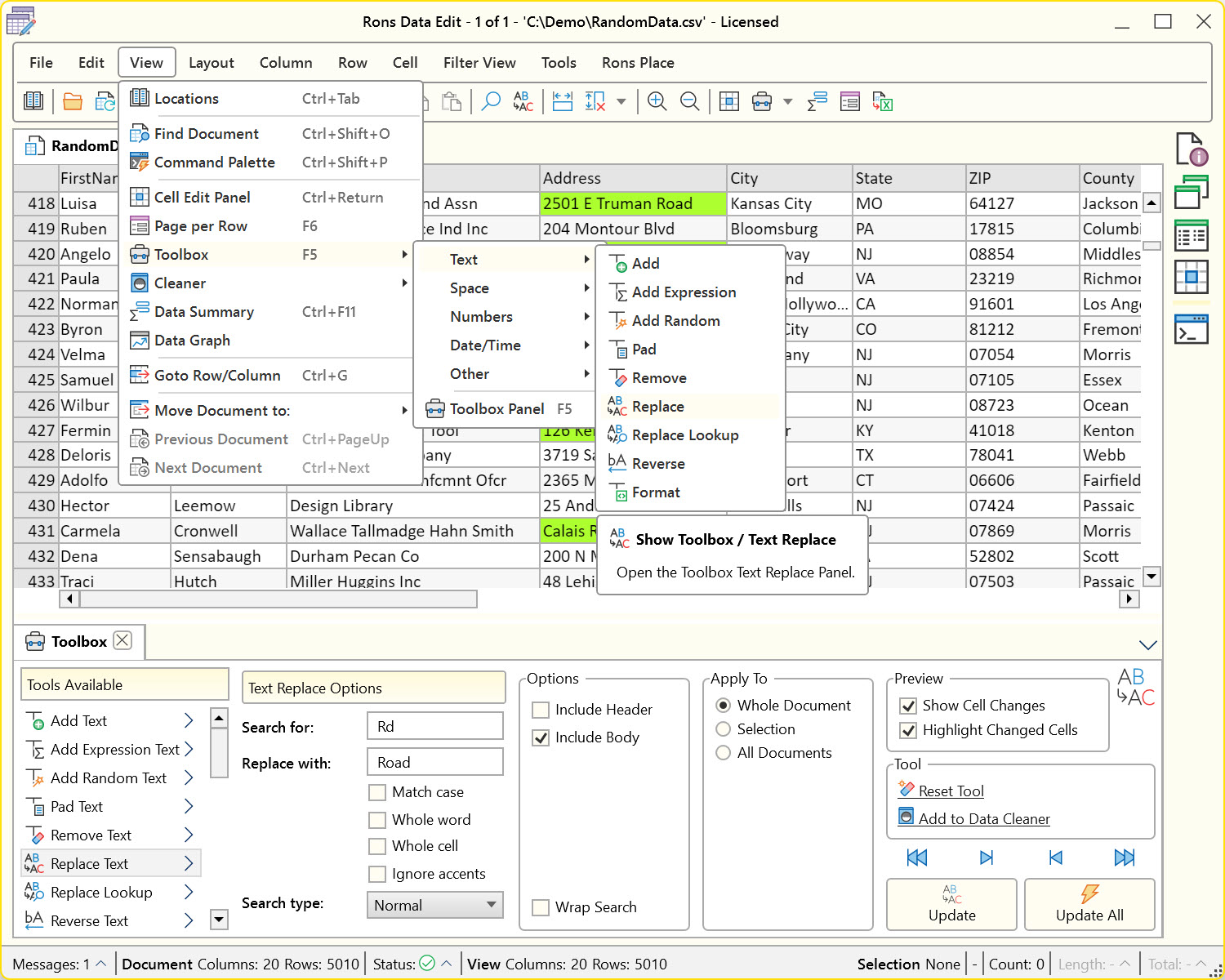
A reliable find and replace function allows these corrections to be made safely across large datasets, reducing manual editing and ensuring consistency. In Rons Data Edit, the Replace Text tool can be found in the Toolbox.
Change Date Format
Dates are notoriously inconsistent in CSV files. Data may come from different regions, applications, or databases, each using its own date format.
Common examples include:
- DD/MM/YYYY → 25/06/2026
- MM/DD/YYYY → 06/25/2026
- YYYY-MM-DD → 2026-06-25
- Day DD Month YYYY → Monday 25 June 2026
- DD Month YYYY → 25 June 2026
- Month DD, YYYY → June 25, 2026
Standardizing date formats improves readability and helps prevent import errors when transferring data between applications. It also ensures that sorting and filtering by date works as expected. In Rons Data Edit, date formats can be modified using the Replace Date Time tool in the Toolbox.
Regional settings are supported both within the tool and at the document level through Document Properties.
In addition the powerful regular expression search capabilities in the Replace Text tool can be used to re-order the numeric components of dates if needed.
Format Numbers
Numbers can vary significantly between systems and countries.
Common issues include:
- Different decimal separators
- Inconsistent thousand separators
- Variable decimal precision
- Numbers stored as text
Applying a consistent number format helps ensure data accuracy and creates a more professional and readable dataset. In Rons Data Edit, number formats can be modified using the Replace Date Time tool in the Toolbox.
As with date formats, regional settings are supported both within the tool and through Document Properties.
Edit Column Headers
Column headers are the first thing users and systems see when working with a CSV file. Poorly named columns can create confusion and slow down data processing.
Typical cleanup tasks include:
- Renaming unclear headers
- Correcting spelling mistakes
- Applying naming conventions
- Removing unwanted characters
Clear and consistent column names make datasets easier to understand and maintain.
Learn how to do this in Rons Data Edit in How To Change the Column Header.
Remove Empty Rows and Columns
Many CSV files contain blank rows or unused columns, especially after exporting data from other systems.
Although harmless at first glance, these empty records can:
- Make files harder to navigate
- Increase file size unnecessarily
- Cause import and processing issues in some applications
Removing empty rows and columns is a quick cleanup task that immediately improves the overall quality of a dataset. Since deleting rows and columns is a standard feature available in virtually all professional CSV editors, this is one of the easiest data-cleaning tasks to perform.
In Rons Data Edit, simply select Delete Empty from the Row or Column section of the menu.
Change Text Case
Inconsistent capitalization is another frequent issue.
Common examples include:
- JOHN SMITH
- john smith
- John Smith
Converting values to a consistent text case can improve presentation and make data appear far more professional. Whether you need uppercase, lowercase, sentence case, or proper case, standardizing text is often a worthwhile early cleanup step. In Rons Data Edit, this can be done using the Change Case tool in the Toolbox.
Remove Duplicates Rows
Duplicate records can appear when data has been merged from multiple sources or imported repeatedly.
Duplicates can lead to:
- Inaccurate reporting
- Inflated counts
- Confusing search results
- Data integrity issues
Identifying and removing duplicate rows helps ensure that each record appears only once and that reports and analyses remain accurate.
To learn how to perform this task in Rons Data Edit, see How To Remove Duplicate Rows in a CSV File.
Automate Cleaning Tasks with Cleaners
Once you've identified the cleanup actions that are performed regularly, automation becomes extremely valuable.
Rons Data Edit includes Cleaners, a feature that allows multiple cleaning operations to be combined into a reusable workflow. Instead of performing the same edits manually every time a new CSV file arrives, you can apply a predefined sequence of actions with minimal effort.
This is especially useful for recurring imports, regularly updated datasets, and files received from the same source. By automating repetitive cleanup steps, users can save time, reduce errors, and maintain consistent results across multiple CSV files.
Start Simple
One of the biggest mistakes when cleaning data is trying to solve every problem at once. In practice, a few simple corrections often provide most of the benefit.
Removing extra spaces, standardizing dates and numbers, cleaning column headers, eliminating empty records, and removing duplicates can dramatically improve data quality in just a few minutes. Once these fundamentals are addressed, more advanced transformations become easier and safer to perform.
A professional CSV editor such as Rons Data Edit provides the tools needed to perform these common cleanup tasks efficiently, making it an excellent starting point for anyone working regularly with CSV data.
Related Information
- A Perfect Excel alternative to handle CSV files
- How to open and view a CSV file
- Rons Data Edit for e-Commerce
- Text Encoding and Languages in CSV Files
- What is a CSV File
- What is the best CSV Editor
- What is the Difference between Rons Data Edit and Rons Data Stream
CSV Editing
Rons Data Edit


